
How to Spot a Fake iPhone Before You Buy One
Learn simple checks like IMEI verification, software testing and build quality inspection to avoid falling for counterfeit iPhones while shopping online or in second hand markets today
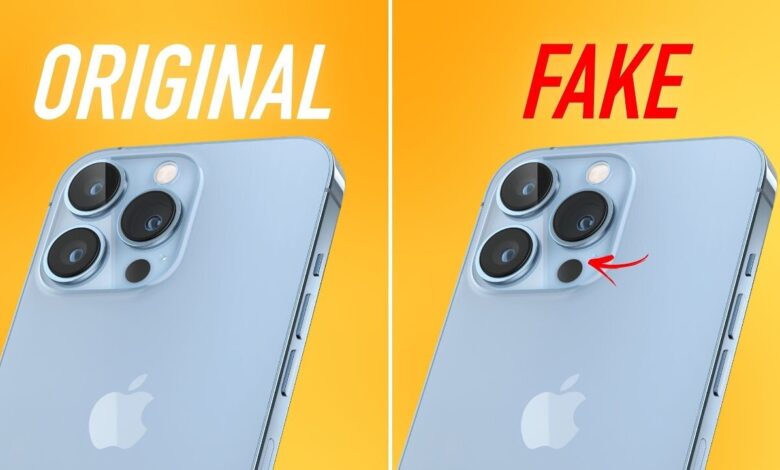
The popularity of Apple iPhones has made them one of the most desired smartphones in the world, but their premium pricing has also created an opportunity for scammers. Many buyers looking for affordable deals in second hand markets or online platforms often end up with counterfeit devices that look almost identical to the real thing.
These fake iPhones may appear convincing at first glance, but they usually fail when it comes to performance, security and long term reliability. Since they are not genuine Apple products, they do not receive official support or software updates, leaving users vulnerable. This makes it essential for buyers to carefully verify a device before making a purchase.
One of the easiest ways to confirm authenticity is by checking the IMEI number. By dialing star hash zero six hash on the phone, a unique IMEI number will appear on the screen. This number can then be entered on Apple’s official website to confirm whether the device is genuine. If the number is invalid or does not match any records, it is a clear warning sign.
Another important step is verifying the serial number. Users can find this by navigating to Settings, then General, and tapping About. Once located, the serial number should be checked on Apple’s official coverage page. A valid device will display accurate details, while a fake one may show errors or no data at all.

Software is another major giveaway. Genuine iPhones always run on iOS, Apple’s proprietary operating system. Counterfeit devices, on the other hand, often use Android systems designed to mimic the look of iOS. Opening the App Store can quickly reveal the truth. A real iPhone only supports Apple’s App Store, while fake devices may redirect users to Google Play Store or similar platforms.
Physical inspection also plays a key role. Authentic iPhones are known for their premium materials, smooth finish and precise design. Buttons feel solid, the Apple logo is neatly placed and the camera module aligns perfectly. Fake devices often have loose buttons, uneven finishing and cheaper materials that are easy to notice upon close inspection.
Connecting the phone to a computer can provide further confirmation. When plugged in using a USB cable, a real iPhone is instantly recognized by iTunes or Finder. If the device fails to connect properly or is not detected, it may not be genuine.
Features like Siri can also help identify authenticity. Pressing and holding the power button should activate Siri on a real iPhone. If the feature is missing or unresponsive, it raises doubts about the device. Buyers should also be cautious about unusually low prices, as deals that seem too good to be true often indicate counterfeit products.
Finally, packaging and accessories should not be ignored. Genuine Apple products come in high quality boxes with well designed branding and neatly packed accessories. Poor packaging, incorrect logos or low quality accessories can signal that the device is not original.
With counterfeit smartphones becoming increasingly sophisticated, a careful inspection using these methods can help buyers avoid fraud and ensure they invest in a genuine iPhone.